Why Doubao Large Model API Call Integration Needs a Gateway
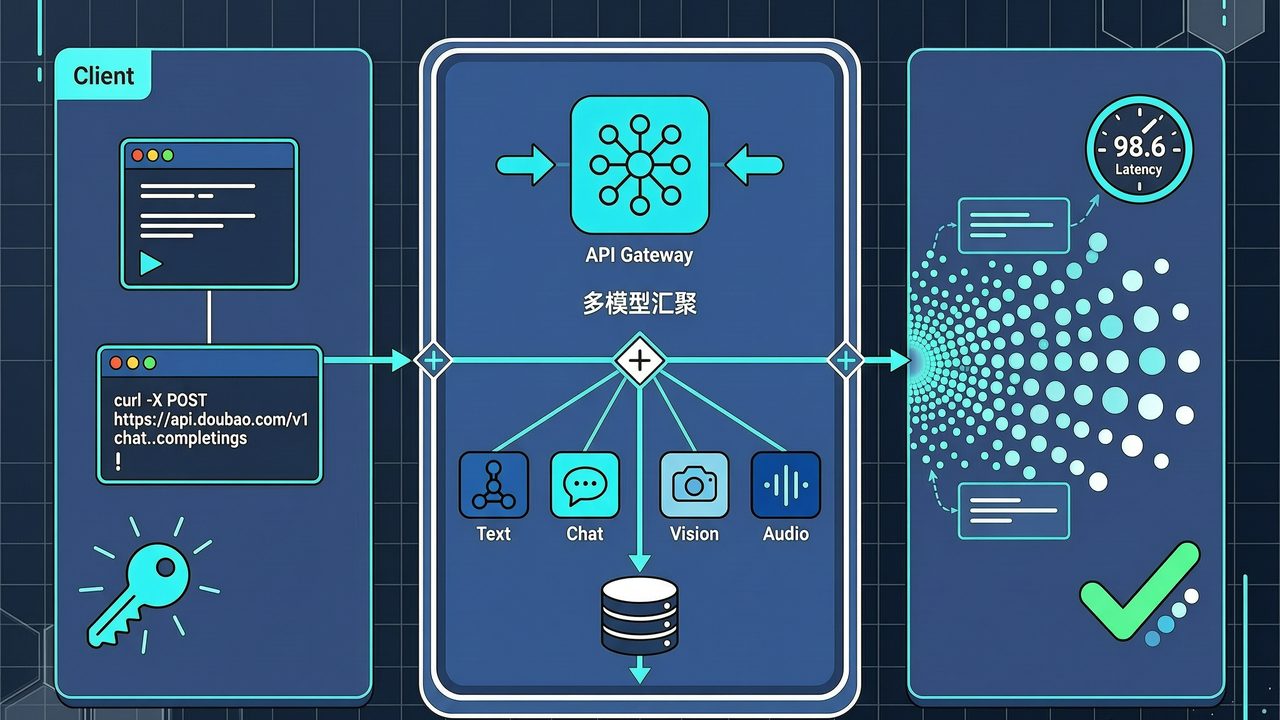
When developers start using Doubao and other large language models, the first step is often a simple API call. The challenge appears when the application grows. Teams may need to compare model quality, handle rate limits, keep costs visible, and avoid vendor lock-in. A unified API gateway helps by exposing an OpenAI-compatible interface, so the same client code can target multiple models with minimal changes.
For teams evaluating cnaibot, the value is practical: one API key can route requests to DeepSeek, Qwen, Claude, GPT and more, depending on the configured channels. Switching models can be as simple as changing the model name and the base URL. Billing can be pay-per-token, with no monthly subscription fee, while the gateway handles request normalization, logging, and failover.
What Is a Doubao Large Model API Call?
A Doubao Large Model API Call usually means sending a chat completion request to a Doubao model endpoint. The request includes a model identifier, a list of messages, optional sampling parameters, and streaming settings. The response returns assistant text, token usage, and metadata. When wrapped in an OpenAI-compatible gateway, the request shape is close to the familiar chat completions format, which reduces the effort to migrate or compare providers.
Typical request fields
- model: the target model name exposed by the gateway
- messages: system, user, and assistant turns in order
- temperature: controls randomness, useful for creative or factual tasks
- max_tokens: limits output length and helps control cost
- stream: enables incremental response chunks
One OpenAI-Compatible Key for Multiple Models
Many providers require separate accounts, separate keys, and slightly different request formats. A gateway can centralize these differences. With cnaibot, developers can use one key for multiple model families if those channels are enabled. The client only needs to point to the gateway base URL and choose a model name.
import os
from openai import OpenAI

client = OpenAI(
    api_key=os.environ.get('GATEWAY_API_KEY'),
    base_url='https://gateway-host/v1'
)

response = client.chat.completions.create(
    model='deepseek-chat',
    messages=[
        {'role': 'system', 'content': 'Answer concisely.'},
        {'role': 'user', 'content': 'Explain API gateway routing.'}
    ],
    temperature=0.2,
    max_tokens=200
)

print(response.choices[0].message.content)
print(response.usage)
In this pattern, a Doubao Large Model API Call can be sent by changing model to a Doubao model name if available in the gateway catalog. The same code structure can be reused for Qwen, Claude, GPT, and other models, making experiments faster.
Streaming Responses for Real-Time Chat
Streaming matters for chatbots, copilots, and internal assistants. Users see tokens as they arrive, which lowers perceived latency. In an OpenAI-compatible gateway, setting stream to true usually returns a series of chunks. The client should append delta content and handle the final usage or finish reason if present.
Streaming checklist
- Use a persistent connection or async iterator
- Render partial text safely without breaking HTML
- Stop generation on cancel or timeout
- Log token usage after completion for cost accounting
- Retry only on safe failures, not after partial user-visible output
Channel Failover and Availability
Provider APIs can return rate limit errors, overload errors, or transient network issues. A gateway can improve resilience by routing a request through alternative channels. For a Doubao Large Model API Call, this means the application can keep working even if one provider endpoint is temporarily unavailable, assuming another channel is configured for the same model family or equivalent fallback.
Failover should be controlled, not automatic in every case. Production systems often need policies:
- Retry only idempotent or retriable errors
- Set a total request timeout, not just a per-provider timeout
- Track failed channels and avoid rapid repeated fallbacks
- Expose fallback events in logs so developers can debug behavior
- Use circuit breaking when a channel remains unhealthy
When the gateway is OpenAI-compatible, application code can remain stable while routing rules change on the infrastructure side.
Pay-Per-Token Pricing and Cost Control
Cost surprises are common in LLM projects. A pay-per-token model makes usage align with demand. With cnaibot, teams can avoid a fixed monthly fee and pay based on input and output tokens. The gateway can also provide usage logs, which helps compare model prices and optimize prompts.
Practical cost controls
- Set max_tokens for each task type
- Use cheaper models for classification and extraction
- Cache repeated requests where appropriate
- Track cost by project, user, or tenant
- Review prompt length, because long context increases input cost
- Use streaming only when needed for user experience
Token usage should be treated as a first-class metric. It supports budgeting, alerting, and model comparison. A unified key makes this easier because usage can be collected from one place rather than several provider consoles.
Model Comparison Workflow
Comparing models is not only about benchmarks. Real applications need to check latency, instruction following, formatting stability, and cost. Because the gateway can expose multiple models through one interface, developers can run the same prompt through different model names and record the results.
A simple evaluation loop
- Choose a small prompt set that reflects production traffic
- Run each model with the same temperature and max_tokens
- Record response time, token usage, and output quality scores
- Repeat with longer context and tool-calling cases
- Keep the model that fits each task, not one model for everything
This workflow is useful when the goal is to integrate a Doubao Large Model API Call alongside other models. It avoids committing to a single provider too early and keeps the switching cost low.
Enterprise Integration Checklist
For enterprise use, API calls are part of a broader system. The gateway should fit into existing security, observability, and release processes.
- Store API keys in a secret manager, not in client code
- Use separate keys for development, staging, and production
- Add rate limits and quota alerts before launch
- Log request IDs and provider trace IDs
- Define retention rules for prompt and response data
- Test failover during a maintenance window
- Validate OpenAI-compatible behavior across model families
A single gateway can reduce integration complexity, but governance still needs clear ownership. Teams should know who can add channels, approve model changes, and review spending.
Developer Tips for Stable API Calls
Small engineering choices improve reliability. For a Doubao Large Model API Call, use short system prompts when possible, request structured output when needed, and handle empty or truncated responses gracefully. If the application sends tool calls, validate the function name and arguments before execution.
Also, avoid sending secrets in prompts. Use least-privilege keys and rotate them regularly. If the gateway supports multiple model families, keep model names in configuration instead of hardcoding them. That makes migration and experiments easier without changing application logic.
Conclusion
Integrating a Doubao Large Model API Call becomes simpler when the client uses an OpenAI-compatible gateway. One key, one request format, and one observability path can cover multiple models, including DeepSeek, Qwen, Claude, GPT and more. Pay-per-token pricing, streaming support, and channel failover help teams build production features while keeping cost and reliability under control.
Try cnaibot to send a Doubao Large Model API Call through a unified OpenAI-compatible gateway and compare models with less integration work.