Why One API Key to Call All Large Models Matters
Modern AI products rarely depend on a single large language model. A support assistant may need a low-cost model for routine replies, a reasoning model for complex tickets, and a vision-capable model when users upload screenshots. For a development team, the challenge is not only choosing the right model, but managing credentials, billing, routing, retries, and observability across multiple providers.
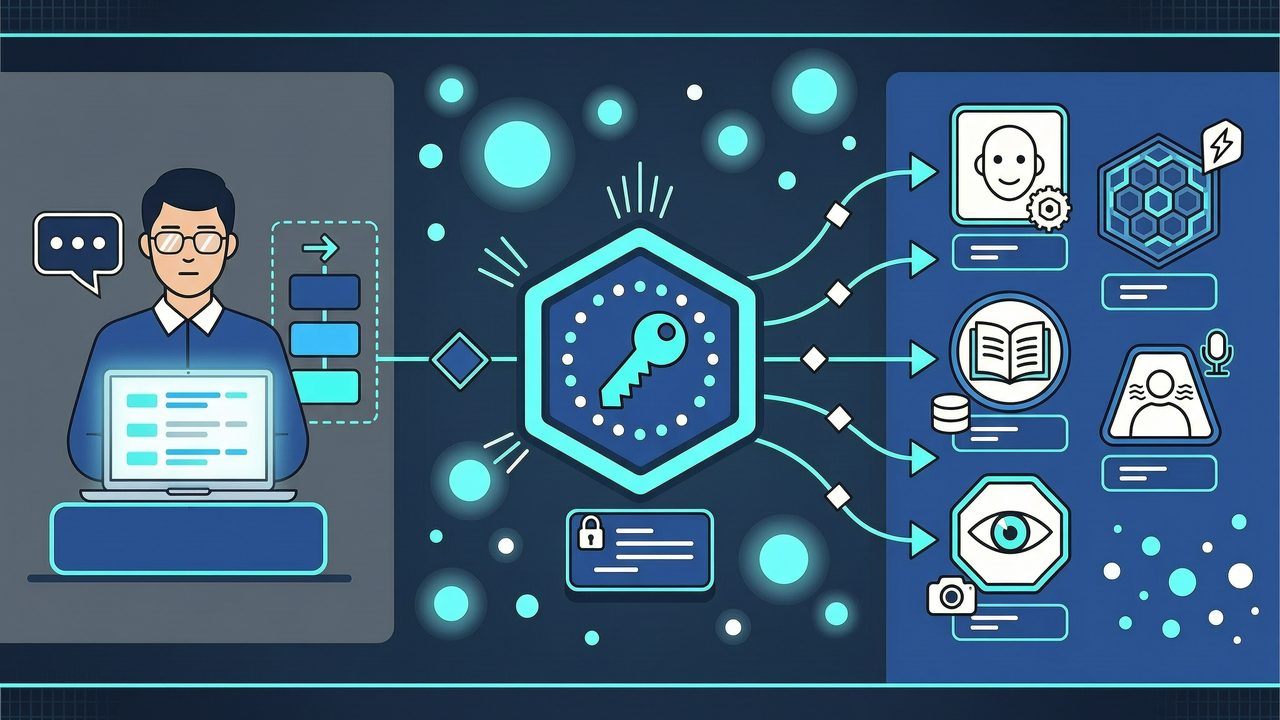
cnaibot is positioned as an OpenAI-compatible LLM API gateway for these situations. Instead of creating and maintaining separate API keys, SDKs, and billing dashboards for each provider, teams can use one API key to call supported models such as DeepSeek, Qwen, Claude, GPT, and others through a compatible interface. This can reduce integration friction while keeping model choice flexible.
What an OpenAI-Compatible LLM Gateway Provides
An OpenAI-compatible gateway exposes request and response formats that resemble the OpenAI chat completions API. Many applications can switch from one provider to another by changing the base_url and the model name, while keeping the same HTTP headers, request body structure, and response parsing logic.
A typical request can look like this:
curl https://www.cnaibot.com/v1/chat/completions -H 'Authorization: Bearer YOUR_KEY' -H 'Content-Type: application/json' -d '{"model":"gpt-4o-mini","messages":[{"role":"user","content":"Summarize this support ticket in three sentences"}]}'
From a developer perspective, the main advantages are:
- One credential for supported models, rather than separate vendor keys.
- OpenAI-compatible requests, which reduces SDK-specific code.
- Model switching by changing the model parameter or base_url configuration.
- Token-based billing, which can simplify usage tracking compared with fixed subscription plans.
- Gateway-level features such as routing, logging, and fallback, depending on the configured channels.
Why this helps product and engineering teams
Teams often need to balance quality, latency, and cost. A gateway can make those tradeoffs easier to manage by centralizing model access. Product managers can ask for a model class, such as 'fast chat' or 'deep analysis', and engineering can map that class to an underlying provider without rewriting the application.
Developer Scenarios Where a Unified Key Is Useful
Prototyping and model evaluation
During prototyping, developers may want to compare models with the same prompt. With a unified gateway, the same request structure can be sent to different models by changing the model field. This makes it easier to evaluate output quality, response speed, and token usage without duplicating provider-specific integration code.
For example, a team testing a document assistant could run the same extraction prompt against a lightweight model and a higher-capability model. If the gateway provides usage data, the team can compare cost per successful response, not only cost per token.
Production routing and channel failover
Production systems need to handle rate limits, temporary provider outages, and model errors. A gateway can be configured with routing rules or fallback channels so that a request is retried or redirected when the first path is unavailable. The application still sends one standard request, while the gateway handles the provider selection behind the scenes.
Failover should be treated carefully. A fallback model may have different capabilities, context length, pricing, or output style. Teams should test whether the alternative model meets product expectations before enabling automatic switching in high-stakes workflows.
Streaming chat interfaces
Many chat applications use streaming to show partial responses as they are generated. OpenAI-compatible streaming works by setting stream=true and processing chunked responses. This can improve perceived latency for users, especially when the full answer may take several seconds.
A unified gateway can make streaming easier to integrate because the application does not need to learn a different streaming format for each provider. Developers still need to handle connection errors, partial output, and cancellation, but the core parsing logic can remain consistent.
Cost control and budgeting
Token pricing varies by model, provider, and usage tier. A gateway that tracks tokens and requests can help teams monitor spending by application, team, or customer. Common controls include:
- Setting request limits for internal tools or public endpoints.
- Logging prompt tokens, completion tokens, and estimated costs.
- Routing simple requests to lower-cost models and complex requests to stronger models.
- Using caching, prompt compression, or shorter context windows when appropriate.
- Separating development and production keys to prevent accidental spend.
Pay-per-token pricing can be useful for workloads with irregular demand. Instead of paying a monthly fee for reserved capacity, teams pay for actual usage. However, cost visibility is still necessary because a single high-volume feature can quickly increase token spend.
Enterprise Integration Considerations
Enterprises often evaluate LLM gateways through governance, not only developer convenience. A unified key can simplify credential management, but it also becomes a central control point. Security teams may want scoped keys, audit logs, rate limits, and clear ownership for each application.
When integrating cnaibot or a similar gateway, useful questions include:
- Which models and providers are currently supported?
- Does the gateway expose usage metrics in a way that can be imported into existing dashboards?
- Can routing policies be configured per project, team, or environment?
- How are sensitive prompts and outputs logged, stored, and retained?
- What happens when a provider changes model availability or pricing?
For multi-team organizations, a gateway can reduce duplicated integration work. One team can maintain the connection layer, while product teams choose model aliases through configuration. This pattern is similar to how organizations use API gateways for microservices: centralize cross-cutting concerns such as authentication, observability, and routing.
Model Comparison Without Rewriting Application Code
Model evaluation often becomes difficult when each provider has a different SDK. A unified interface allows teams to keep the same request pipeline and change only the model identifier. This can support structured A/B testing for use cases such as:
- Customer support classification and reply generation.
- Code review assistance with different context lengths.
- RAG answers that need either lower cost or stronger reasoning.
- Translation and summarization tasks across languages.
Good comparison should include more than model name. Teams may track latency, output quality, refusal rate, formatting reliability, and total cost per successful interaction. A gateway can make these measurements easier when usage data is available for each request.
Limitations and Practical Expectations
A unified key does not make all models identical. Different models have different training data, context windows, tool-calling behavior, image input support, and safety policies. An OpenAI-compatible request format can reduce friction, but it does not guarantee identical output quality or identical capabilities.
Teams should also verify provider terms, data handling expectations, and regional availability before routing production traffic. A gateway can simplify integration, but application owners remain responsible for model behavior, user experience, and compliance requirements.
When a Single Key Gateway Is a Good Fit
One API key to call all large models is most useful when an application needs flexibility across multiple providers, wants to reduce vendor-specific integration work, and prefers token-based billing for variable usage. It can be especially helpful for products that need model evaluation, streaming interfaces, fallback routing, and centralized cost visibility.
cnaibot presents an OpenAI-compatible path for these workflows, allowing developers to work with supported models through a unified gateway while changing base_url and model configuration when switching providers.
You can try cnaibot to see how one API key works across supported models in a real integration workflow.